by Alexia on Jun 4, 2026, 10:25:47 AM
Your web panel just got a productivity boost designed to help you get more done in Sync, faster.
Edit text files right in your browser, download multiple files and folders as a ZIP, check folder sizes before downloading, and learn more about sharing with our new on-demand webinars.
Here’s what’s new:
Edit text files directly in the web panel
Need to make a quick change to a note, markdown file, code snippet, or HTML file?
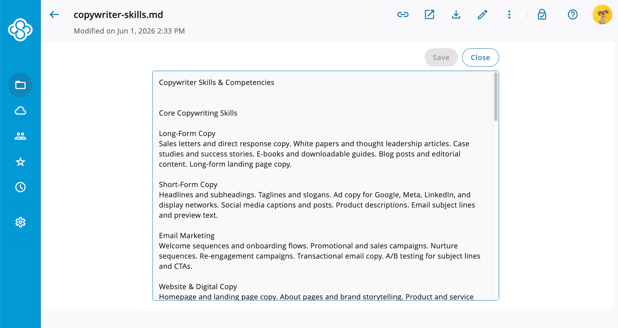
Editing a text-based file directly in the web panel.
Our new text editor lets you make updates directly from the Sync web panel, without downloading, opening another app, or syncing files to your desktop first. It’s simple, fast, and easy to use, with support for plain-text file formats such as .txt, .md, .js, .html, and more.
Keep everything in Sync from start to finish.
We’ve also built text editing directly into the create-file flow. Create a new text file in the web panel, optionally change the file extension, and start editing right away.
And because this is Sync, text editing is fully end-to-end encrypted. Editing happens client-side in your browser, helping keep your files private.
Download files and folders as a ZIP
One of your most-requested web panel features is here: Download as ZIP.
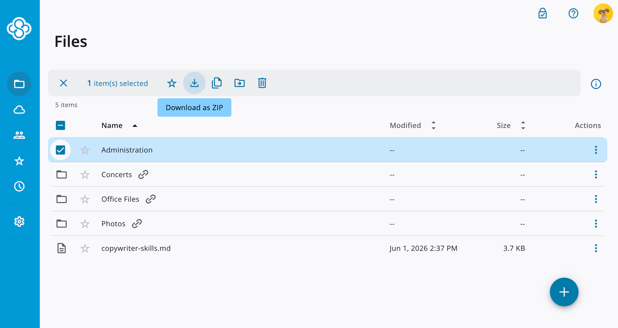
The new download as ZIP option in the web panel.
Select one or more files and folders, click Download as ZIP, and get everything packaged into a single .zip file.
That means no more downloading files one at a time. No more manually rebuilding folder structures after downloading. Just select what you need, download it, and you’re done.
ZIP downloads are fast, easy to use, and fully end-to-end encrypted. Your files remain private during the download process, with ZIP packaging handled client-side.
Chrome supports ZIP downloads of any size, depending on how much local storage is available (we’ve successfully tested folders larger than 20 GB). Firefox and Safari currently support downloads up to 2 GB.
All this is to say, large downloads from the web are now faster, cleaner, and much easier to manage.
View folder sizes before downloading
To make ZIP downloads even easier, we’ve added folder size visibility to the web panel.
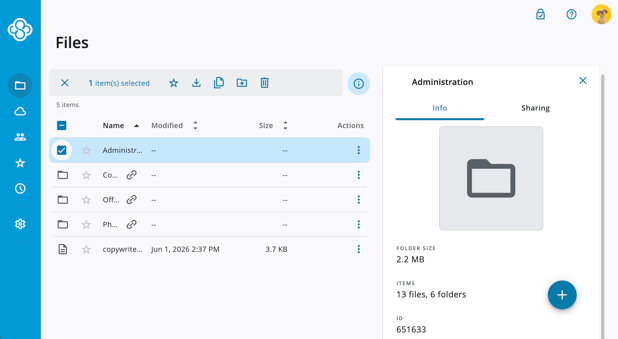
Folder size information displayed in the info pane.
Click the info panel on any folder to see its size. Select multiple files and folders to see the total size before downloading. This makes it easier to confirm how large a download will be before it starts.
It’s also a helpful way to compare what’s in Sync with what’s stored locally.
Note that web panel folder sizes may be different from local folder sizes if some files were skipped or are not synced locally.
Watch our new sharing webinars
This one isn’t a product feature, but it is something new that will help you get the most out of Sync sharing. Learn how to:
- Share files and folders using links
- Share with recipients who don’t have a Sync account
- Request files from others
- Add your company logo to shared links
- Set up company-wide collaborative shared folders and document repositories
The webinars are quick, easy to watch, and packed with practical tips you can use right away. Watch the webinars here.
Try the new web panel features today
These updates are available for everyone, on every Sync plan. They are all about making your Sync experience faster and easier to use from the web.
Whether you’re making a quick text edit, downloading a project folder, checking folder sizes, or learning how to share more effectively, get more done directly from your browser while keeping your files private with end-to-end encryption.
Sync 5.0.2 Windows CloudFiles Beta App Available
Sync 2.2.37 Desktop Apps Available